О команде dbt debug
Используйте dbt debug для проверки подключения к базе данных и проверки настройки системы.
dbt debug — это вспомогательная утилита для тестирования подключения к базе данных и отображения информации для целей отладки, такой как корректность файла проекта, версия dbt и наличие всех необходимых зависимостей (например, git, когда вы запускаете dbt deps).
Команда проверяет подключение к базе данных, локальную конфигурацию и системное окружение по нескольким направлениям, помогая выявить потенциальные проблемы до запуска других команд dbt.
По умолчанию dbt debug проверяет:
- Подключение к базе данных (для настроенных profiles)
- Настройку dbt‑проекта (например, корректность
dbt_project.yml) - Системное окружение (операционную систему, версию Python, установленную версию dbt)
- Необходимые зависимости (например,
gitдляdbt deps) - Сведения об адаптере (установленные версии адаптеров и их совместимость)
*Примечание: не путать с логированием уровня debug через опцию --debug, которая увеличивает подробность вывода.
Flags
Большинство флагов dbt debug применимы к CLI dbt Core. Некоторые флаги также работают в Cloud CLI, но в Studio IDE поддерживается только --connection.
- CLI dbt Core: поддерживает все флаги.
- Studio IDE: поддерживает только
dbt debugиdbt debug --connection. - Cloud CLI: поддерживает только
dbt debugиdbt debug --connection. Также вы можете использовать командуdbt environmentдля взаимодействия с вашим окружением dbt.
dbt debug поддерживает следующие флаги при использовании интерфейса командной строки (CLI):
Usage: dbt debug [OPTIONS]

 Show information on the current dbt environment and check dependencies, then
 test the database connection. Not to be confused with the --debug option
 which increases verbosity.

Options:
 --cache-selected-only / --no-cache-selected-only
                At start of run, populate relational cache
                only for schemas containing selected nodes,
                or for all schemas of interest.

 -d, --debug / --no-debug
                Display debug logging during dbt execution.
                Useful for debugging and making bug reports.

 --defer / --no-defer
                If set, resolve unselected nodes by
                deferring to the manifest within the --state
                directory.

 --defer-state DIRECTORY
                Override the state directory for deferral
                only.

 --deprecated-favor-state TEXT
                Internal flag for deprecating old env var.

 -x, --fail-fast / --no-fail-fast
                 Stop execution on first failure.

 --favor-state / --no-favor-state
                If set, defer to the argument provided to
                the state flag for resolving unselected
                nodes, even if the node(s) exist as a
                database object in the current environment.

 --indirect-selection [eager|cautious|buildable|empty]
                Choose which tests to select that are
                adjacent to selected resources. Eager is
                most inclusive, cautious is most exclusive,
                and buildable is in between. Empty includes
                no tests at all.

 --log-cache-events / --no-log-cache-events
                Enable verbose logging for relational cache
                events to help when debugging.

 --log-format [text|debug|json|default]
                Specify the format of logging to the console
                and the log file. Use --log-format-file to
                configure the format for the log file
                differently than the console.

 --log-format-file [text|debug|json|default]
                Specify the format of logging to the log
                file by overriding the default value and the
                general --log-format setting.

 --log-level [debug|info|warn|error|none]
                Specify the minimum severity of events that
                are logged to the console and the log file.
                Use --log-level-file to configure the
                severity for the log file differently than
                the console.

 --log-level-file [debug|info|warn|error|none]
                Specify the minimum severity of events that
                are logged to the log file by overriding the
                default value and the general --log-level
                setting.

 --log-path PATH
                Configure the 'log-path'. Only applies this
                setting for the current run. Overrides the
                'DBT_LOG_PATH' if it is set.

 --partial-parse / --no-partial-parse
                Allow for partial parsing by looking for and
                writing to a pickle file in the target
                directory. This overrides the user
                configuration file.

 --populate-cache / --no-populate-cache
                At start of run, use `show` or
                `information_schema` queries to populate a
                relational cache, which can speed up
                subsequent materializations.

 --print / --no-print
                Output all {{ print() }} macro calls.

 --printer-width INTEGER
                Sets the width of terminal output

 --profile TEXT
                Which existing profile to load. Overrides
                setting in dbt_project.yml.

 -q, --quiet / --no-quiet
                Suppress all non-error logging to stdout.
                Does not affect {{ print() }} macro calls.

 -r, --record-timing-info PATH
                When this option is passed, dbt will output
                low-level timing stats to the specified
                file. Example: `--record-timing-info
                output.profile`

 --send-anonymous-usage-stats / --no-send-anonymous-usage-stats
                Send anonymous usage stats to dbt Labs.

 --state DIRECTORY
                Unless overridden, use this state directory
                for both state comparison and deferral.

 --static-parser / --no-static-parser
                Use the static parser.

 -t, --target TEXT
                Which target to load for the given profile

 --use-colors / --no-use-colors
                Specify whether log output is colorized in
                the console and the log file. Use --use-
                colors-file/--no-use-colors-file to colorize
                the log file differently than the console.

 --use-colors-file / --no-use-colors-file
                Specify whether log file output is colorized
                by overriding the default value and the
                general --use-colors/--no-use-colors
                setting.

 --use-experimental-parser / --no-use-experimental-parser
                Enable experimental parsing features.

 -V, -v, --version
                Show version information and exit

 --version-check / --no-version-check
                If set, ensure the installed dbt version
                matches the require-dbt-version specified in
                the dbt_project.yml file (if any).
                Otherwise, allow them to differ.

 --warn-error
                If dbt would normally warn, instead raise an
                exception. Examples include --select that
                selects nothing, deprecations,
                configurations with no associated models,
                invalid test configurations, and missing
                sources/refs in tests.

 --warn-error-options WARNERROROPTIONSTYPE
                If dbt would normally warn, instead raise an
                exception based on include/exclude
                configuration. Examples include --select
                that selects nothing, deprecations,
                configurations with no associated models,
                invalid test configurations, and missing
                sources/refs in tests. This argument should
                be a YAML string, with keys 'include' or
                'exclude'. eg. '{"include": "all",
                "exclude": ["NoNodesForSelectionCriteria"]}'

 --write-json / --no-write-json
                Whether or not to write the manifest.json
                and run_results.json files to the target
                directory

 --connection
                Test the connection to the target database
                independent of dependency checks.
                Available in Studio IDE and dbt Core CLI

 --config-dir
                Print a system-specific command to access
                the directory that the current dbt project
                is searching for a profiles.yml. Then, exit.
                This flag renders other debug step flags no-
                ops.

 --profiles-dir PATH
                Which directory to look in for the
                profiles.yml file. If not set, dbt will look
                in the current working directory first, then
                HOME/.dbt/

 --project-dir PATH
                Which directory to look in for the
                dbt_project.yml file. Default is the current
                working directory and its parents.

 --vars YAML
                Supply variables to the project. This
                argument overrides variables defined in your
                dbt_project.yml file. This argument should
                be a YAML string, eg. '{my_variable:
                my_value}'

 -h, --help
                Show this message and exit.
Example usage
Проверить только подключение к платформе данных и пропустить остальные проверки, которые выполняет dbt debug:
dbt debug --connection
Показать настроенное расположение файла profiles.yml и завершить выполнение:
dbt debug --config-dir
To view your profiles.yml file, run:

open /Users/alice/.dbt
Проверить подключение в Studio IDE:
dbt debug --connection
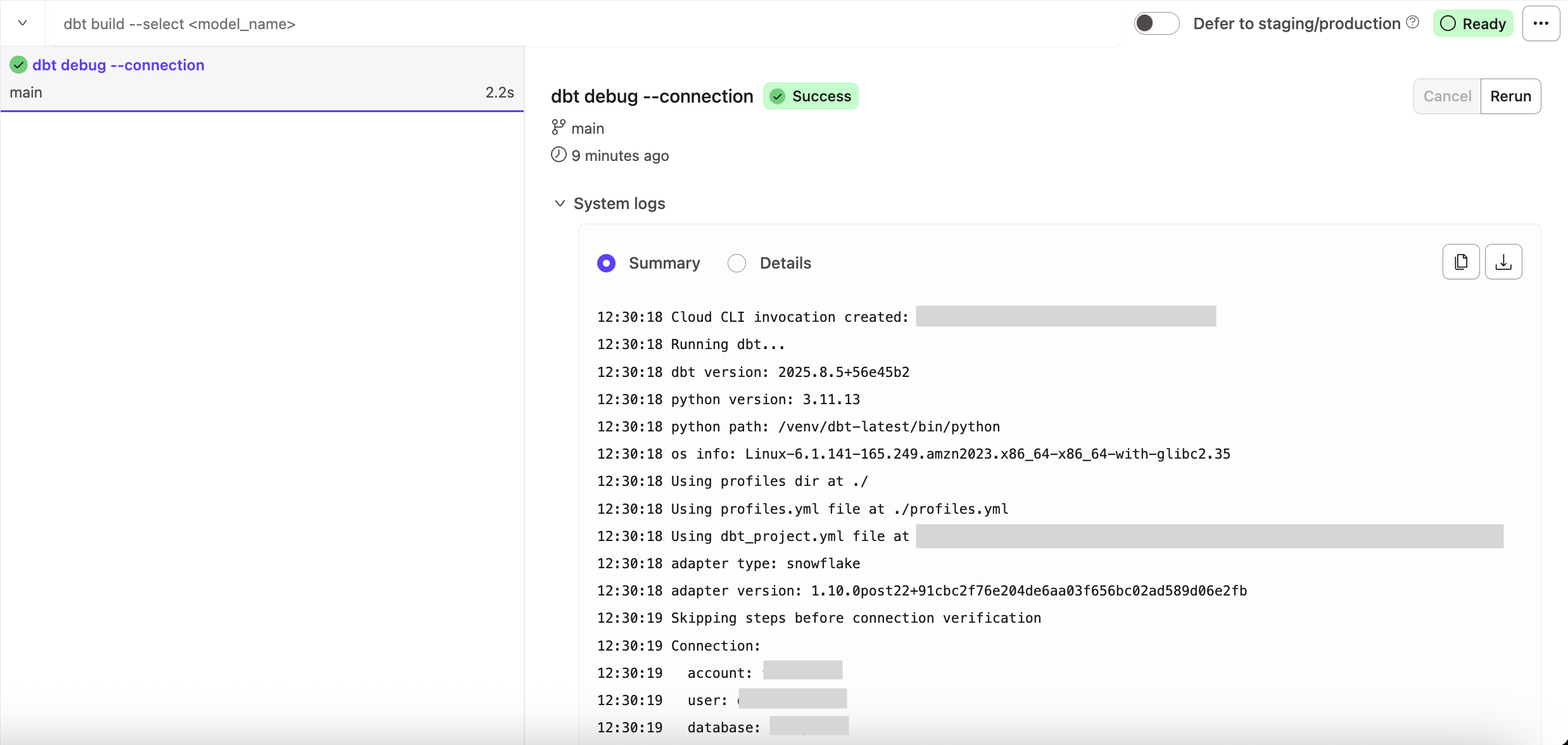 Проверка подключения в Studio IDE